Coming soon to the App Store

Every city,
one dial.

Meridian turns each city you care about into an hour hand. One look tells you who's at breakfast, who's at work and who's asleep. Drag the dial to see what time it will be, everywhere.

iPhone and iPad · Apple Watch · Widgets and StandBy
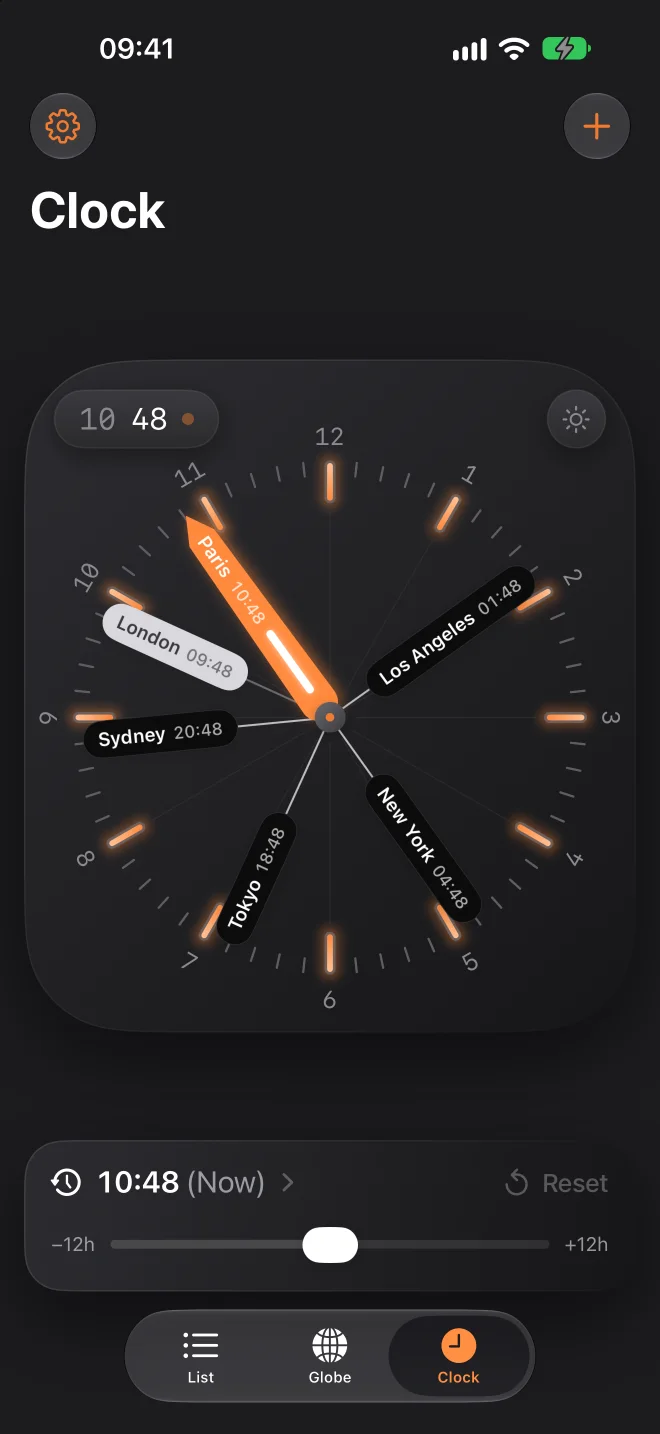
Meridian on iPhone: Paris as the orange needle at 10:48, with London, Sydney, Tokyo, New York and Los Angeles as hands on the same dial.
  • 170 hand-picked cities
  • every time zone on Earth
  • ±12 hours of time travel
  • 4 complication styles
  • 0 accounts, ads or trackers
The dial

Your cities, right now.

This is the real time in your city and in the five the app starts with. Light labels are in daylight, dark ones are at night. Drag around the dial to travel through time: one full turn is twelve hours.

Paris
10:48

Now

−12h +12h

Tap a city to put it on the orange needle.

iPhone and iPad

Day or night, it fits.

The dial is lit like a real watch face: glowing orange indices, soft raised surfaces, and an appearance that follows your iPhone, or the one you pick.
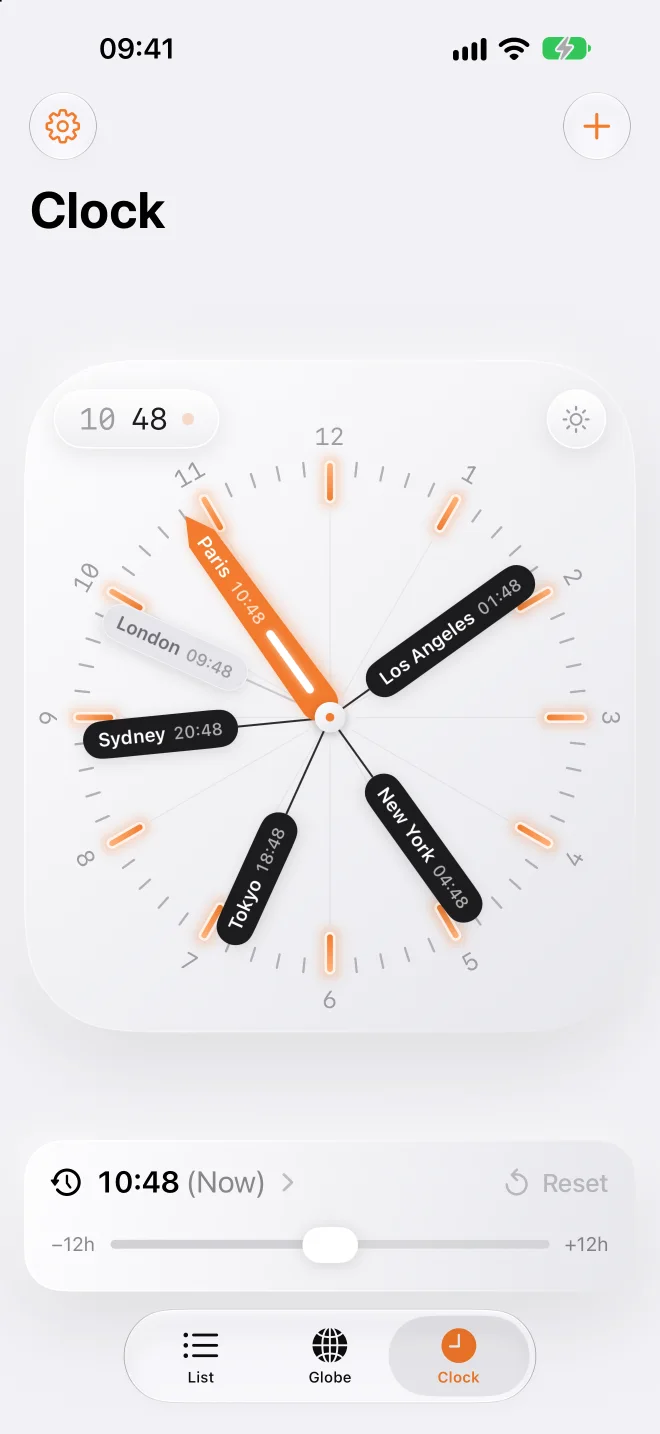
The Clock tab in light mode: six cities on the dial, the time-travel slider below.
LightSoft grey surfaces, lit from the top-left.
The Clock tab in dark mode: the same dial with brighter orange lume.
DarkBrighter lume for late-night calls.
What's inside

More than a world clock.

One dial for every city

Each city is an hour hand with its name and time at the tip. Cities on the same time share a label, so the dial stays clean.

Time travel

Drag the dial or the slider up to 12 hours either way, or tap the time to pick an exact date in any city's zone.

A 3D globe

Every city on a satellite globe with its time above it. Tap a city in the strip and the camera flies there.

Every time zone

170 hand-picked cities, plus every other time zone. Search by city, country, zone or abbreviation, or add where you are.

The list

Each city's day and offset from your local time. Swipe to delete, drag to reorder, tap to highlight.

Private by design

No account, no ads, no tracking. Your cities sync between iPhone and Apple Watch through your own iCloud.

Apple Watch · Widgets · StandBy

Wherever you look.

On your wrist, on its own.

The Apple Watch app runs without your iPhone. The same dial, with the other cities as thin hands and yours on the orange needle.

  • Turn the Digital Crown to travel ±12 hours, with a click every five minutes.
  • Add cities by dictation, Scribble or the watch's own location.
  • Complications for circular, corner, rectangular and inline faces.

On your nightstand.

Charge your iPhone on its side and StandBy shows the whole world dial, every city on its hour. Inside the app, turn your iPhone sideways for a night clock that stays on and dim.

  • Clock only, or with your cities or the globe beside it.
  • Home Screen widgets in small and large, following the city you highlight or one you pick.
Price

Pay once. Keep it all.

No subscription, no in-app purchases, no ads. One price for every screen Meridian runs on.

Meridian

€2.99once

Shared with your family at no extra cost.

  • The iPhone and iPad app: dial, list and globe.
  • The standalone Apple Watch app and its complications.
  • Home Screen widgets and StandBy.
  • Every future update.

Indicative price; the App Store shows yours, in your currency, before you buy.

Contact and support

Questions? Any time zone.

Want to know when Meridian is out, have a question, or found something that doesn't work as it should? Write to us and we'll reply by email.

  • Pick "Tell me when it's out" and we'll send you one email on launch day.
  • Something not working? Tell us your device and its iOS or watchOS version.
  • A city missing from the list? Tell us which one.

Send us a message

Used to reply to you and nothing else.

Your message goes straight to us, see the privacy policy.

Message sent.

Thanks for writing. We'll reply to the address you gave.

Before you ask

Straight answers.

How much is Meridian?
€2.99 once, or the equivalent in your currency. There's no subscription and nothing to unlock: the iPhone, iPad and Apple Watch apps, the widgets and the complications are all included, and Family Sharing is on.
Does the Apple Watch app need my iPhone?
No. It runs on its own and can be installed straight from the App Store on your watch. If you use both, your cities sync between them through iCloud.
Which cities can I add?
About 170 hand-picked cities, shown on the globe, plus every other time zone known to your iPhone. Search by city, country, zone name or abbreviation (like "PST" or "CET"), or add the city you're in.
Does it handle daylight saving time?
Yes. Times come from your iPhone's own time zone database, so clock changes are applied on the right day in every city, including when you travel through time across a change.
What do I need?
An iPhone or iPad with iOS 17 or later, and for the Watch app, an Apple Watch with watchOS 11 or later. Meridian is in English and French.
Do you collect any data?
No. There's no account, no advertising and no tracking: your cities stay on your devices and in your own iCloud. The details are in the privacy policy.